Signed in as:
filler@godaddy.com
Signed in as:
filler@godaddy.com


In traditional single-nozzle multi-material printing, purging is needed to clear leftover material between filament changes.Vortek changes that with an intelligent hotend-swapping system that replaces the entire hotend — delivering faster, cleaner prints with minimal waste.

The Vortek system works seamlessly with our highly reliable AMS (Automatic Material System), making the entire filament change process fully automatic — no need to manually load each filament into the toolhead.
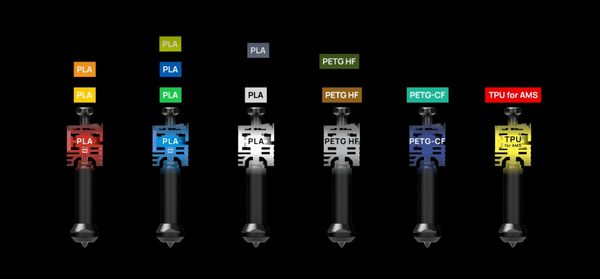
The Vortek system can store filament information in the hotend’s memory, ensuring the correct filament is matched to each hotend. If you are printing with more than seven filament types, the system can calculate the optimal combination to minimize purge waste.

Because only the hotend is swapped, the system can house up to six replaceable hotends without significantly reducing the build volume.That means more materials, more colors, and more possibilities — all in one print.

Precise cutting on variety of materials

Our high standards for reliability led us to move away from contact-based metal pins, which are prone to oxidation and unstable connections.We developed a contactless solution that ensures a stable, high-frequency connection — the foundation for precise temperature control and intelligent hotend sync.

The H2D's BirdsEye camera, combined with computer vision algorithms, delivers top-view alignment accuracy up to 0.3mm. This advanced spatial alignment allows users to placeUnlike traditional toolchanger printers that limit color count by the number of toolheads, the H2C supports up to 24 materials in a single print through parallel-connected AMS units. Its intelligent algorithm optimizes filament-to-hotend allocation to minimize purge waste while delivering outstanding multi-color and multi-material results.
the tool path at the right position on the material-truly "what-you-see-is-what-you-get."

With its seamless enclosure and adaptive airflow system, the H2C maintains a stable chamber temperature for high-performance materials and filters the air to keep your workspace clean and safe.

Our inductive nozzle offset calibration is fully automated — no manual steps, no calibration plates, no extra setup. In just a few minutes, the H2C precisely calibrates nozzle offset to within 25 microns.*

The H2C's Vortek system lets you dedicate one of its six interchangeable hotends to specific filaments — a game-changer for valuable engineering materials.This ensures superior consistency and reliability across prints. Each hotend can even automatically store filament information, so the next time you load that material, it's instantly matched to the correct hotend.

The PMSM servo extruder delivers up to 10 kg of maximum extrusion force—70% more than stepper motor—dramatically improves high-flowrate extrusion stability. Our proprietary servo architecture samples resistance and position at 20 kHz, actively detecting filament grinding and clogs in real time.

With its Vision Encoder, the H2C achieves a distance-independent motion accuracy of less than 50 μm—thinner than human hair. The system automatically compensates for any mechanical drift during calibration, ensuring consistent precision and peak performance over time.*

The H2C leverages both the servo motor on the extruder and the high-resolution eddy current sensors on the nozzle to sense extrusion dynamics. This enables precise extrusion control and automatic calibration of Pressure Advance (PA) parameters for each filament, resulting in smoother surfaces and cleaner, sharper edges.

All seven nozzles in the system can reach a maximum temperature of 350 °C, allowing you to print with our entire filament lineup using any nozzle you choose.

The H2C's 65 °C actively heated chamber minimizes warping and deformation while enhancing layer adhesion for high-performance, high-temperature filaments.

The H2C's three-stage filtration system is essential for printing with engineering filaments. This powerful combination of a G3 pre-filter, an H12 HEPA filter, and a coconut shell activated carbon filter effectively minimizes the odors and harmful particulates often released by engineering materials.

The H2C is equipped with an array of 59 sensors* and a quad-camera computer vision system, all orchestrated by our proprietary neural algorithm. During printing, this system delivers intelligent, real-time diagnostics that can detect even the most subtle print anomalies as they happen. You don't have to be an expert to solve problems—your printer does the job for you.

The H2C features an AI-backed nozzle camera with macro lens. This intelligent monitoring system continuously tracks extrusion patterns, immediately detecting material accumulation, filament deviations, and extrusion failures.

Before each print, the H2C's vision system runs a full pre-flight inspection — scanning the build surface for debris and confirming your print start settings. Everything is verified automatically, so every print starts perfectly.

The H2C's chamber is constructed entirely with flame-retardant material, providing robust, passive fire safety protection across the entire enclosure.

The H2C utilizes a sophisticated closed-loop temperature control system for all heating components. By constantly cross-referencing real-time data from multiple sensors, the system ensures stable, precise thermal management, allowing the device to run efficiently and consistently within optimal temperature ranges.

The H2C offers convenient cloud connectivity for remote control from any device.For security-sensitive applications, it also provides full offline functionality, ensuring complete physical isolation. Users can operate the printer, send files, and update firmware without an internet connection.For advanced users, Developer Mode enables MQTT port access for integrating third-party components and software.*



(depending on selected combo)

(depending on selected combo)


The H2D laser full combo has a built-in air pump and air pipe on the back of the printer, and is pre-installed with a BirdsEye camera. The front door, left and right side Laser Protective Windows, and top cover are all designed with laser protection. The packaging list includes a laser module, a cutting module, a smoke exhaust pipe and its adapter, as well as an emergency stop button.
We plan to launch a laser upgrade kit for the non-laser version of H2D. The upgrade kit is expected to be released in Q3 and will also provide installation instructional videos to help users complete the upgrade smoothly.
It is important to note that the air pump in the upgrade kit is an external air pump, which has a different installation structure from the built-in air pump in the full set. When using it, it can only be installed externally and connected to the machine through an air tube.
Upgrading the non-laser H2D to H2D Laser Edition through the laser upgrade kit retains identical product functions and performances as the H2D Laser Edition.
Yes, the left and right hotends have identical structures and materials, and can be used interchangeably.
The H2D supports a maximum of 4 AMS 2 Pro and 8 AMS HT connected simultaneously, a total of 12 units with 24 slots.
Because H2D is a dual-hotend printer, and in the most extreme scenario, all AMS can be connected to one hotend while the other hotend uses an external spool holder, it can support up to 25 colors.
The first-generation AMS has been confirmed to have full plug-and-play compatibility and can be used with the H2D for multi-color printing, but it does not support the AMS drying function.
Due to the fundamental differences in the feeding mechanism and buffering structure, the H2D does not support the AMS lite.
The two 4-pin ports on the back are reserved for future expansion accessories. For example, to upgrade a non-laser version of the printer to a laser version, one of these ports can be used to connect an external air pump.
Although the hotend of the H2D series is similar to the A1 hotend in structure , it is not exactly the same.
The H2D hotends are specifically designed for the H2D printer, offering optimized compatibility. For example, they support a larger maximum volumetric flow rate, lower clogging risk, more precise nozzle offset calibration between the left and right hotends, and automatic hotend type recognition via the live camera. Therefore, to ensure optimal print quality, it is strongly recommended not to use A1 hotends on the H2D printer.
Therefore , to ensure you get the best print quality, we strongly recommend that you do not use the A1 hotend for H2D printers.
Purchasing additional H2D hotends for use on A1 printers is feasible. However, you will also need to use the H2D hotend silicone sock.
Both the 10W and 40W laser modules are blue light lasers that support processing a variety of materials, including wood, rubber, metal sheets, leather, dark acrylic, and stone. However, due to differences in power and size, there are the following distinctions:
1.Maximum cutting thickness(For Basswood Plywood):
10W laser module: 5mm;
40W laser module: 15mm;
2.Maximum engraving speed(For Basswood Plywood):
10W laser module: 400mm/s ;
40W laser module: 1000mm/s ;
3.Processable Area:
10W laser module: Maximum processing area X310mm * Y270mm, maximum processing height 280mm;
40W laser module: Maximum processing area X310mm * Y250mm, maximum processing height 265mm;
The package does not include a standard USB flash drive. You can still initiate printing normally without a USB, as the printer has built-in storage space to run print files.
However, without a USB inserted, the following functions will be affected:
1. The recording and time-lapse photography functions can't be turned on;
2. Printing cannot be initiated through the LAN;
3. Print files cannot be sent to the machine for storage through the studio;
4. Log files cannot be exported;
USB2.0 protocol or above (actual minimum write speed needs to be greater than 10M/s), supported file formats are FAT32 and exFAT. And the printer only supports mounting one USB, and cannot connect multiple USB via a USB hub.
The hotend to be used for printing has already been determined when the model file is sliced. As for the built-in models, the right hotend has been selected during the slicing process, so it is impossible to change the hotend used for printing on the printer screen.
When you slice the file in Bambu Studio and send the print task , you can freely choose to use the left hotend or the right hotend. For some filaments, such as TPU and PPS/PPA-CF, it is recommended to use specific hotends for printing.
For more details on H2D filament printing, please check the wiki
H2D is equipped with an efficient exhaust system that effectively removes smoke and dust generated by laser operations, significantly reducing contamination. During R&D, we conducted rigorous testing to ensure that with regular machine cleaning, the impact of smoke and dust on performance and precision is negligible. For detailed cleaning instructions, please refer to: wiki
Due to the flexible nature of TPU filaments, there are some operational issues that can arise during feeding and printing. To facilitate TPU printing, we have created a dedicated Wiki guide. Simply follow the instructions in the Wiki to successfully print with TPU filaments: wiki
Because laser processing involves using high-energy lasers on potentially flammable materials, we strongly advise users not to leave the machine unattended during laser operations. Please maintain constant vigilance over the machine's operational status and ensure that there are no flammable or explosive materials in the machine's surroundings. For more information please refer to: wiki
Copyright © 2012-2026 Inventadore Industries.
All rights reserved. (Sitemap) Classic View
Website designed & built by Inventadore Studio